Welp… Linux it is, then
Nahh bro just use third party script then re run it every update 🤡
deleted by creator
Till they change their mind again. Ms in my experience also really like to disregard your settings
for now
They update, this third party script is to make windows less rapey
deleted by creator
I wish haha
deleted by creator
Thank you for your input but I will continue comparing mega corpo behvior to sexual assault because it an illustrative analogy.
Cheers ;)
Updates in Linux are not random third party scripts you find online, why are you spreading this lie?
You go into your app store/software centre and click update. To the user, this is all they see.
If you want to feel like a hacker, or find it quicker, you can open a terminal run sudo dnf update or whatever. That’s still not a random third party script, though.
deleted by creator
0/10 bait
deleted by creator
-1/10 bait
every linux user: Oh no…well anyway
It is good to use linux. But this has an impact on everyone to some degree. You may use Linux, but does your family, friends, your doctor, your teacher or boss, and whoever else who has some of your personal data?
You do bring a good point. Every doctor will havemy phone number on file and recall will screen shot that. I cant do anything to stop that. Same with every other piece of data.
At least my doctor won’t have screen shot of everything, web page, picture, word doc, friends lists, political news, I view on screen.
Someone will have vital information stolen from a recall hack on a 3rd party
My data being in the hands of a 3rd party at all is arguably a larger risk than said 3rd party running Windows. No single individual can control what OS any particular 3rd party runs, and if you hand data over to a 3rd party, at some point you have to trust them. If you don’t trust them, find someone you can trust.
Don’t make everyone else’s choice of OS my problem.
Tbh I’d pay money for a foss alternative here. There are smart systems in KDE and Gnome already but if it could recall exact details on free software it would be awesome.
You can install key and screen loggers if you want. Could even setup offsite backup and rclone it all wherever you want.
laughs in Linux
There’s nothing to laugh about. The maniacally evil thing about recall is, that it doesn’t matter what you do to keep your devices clean. If you interact with someone who doesn’t keep his devices clean, which is 100% of us, you’re on recall
My windows10 install still asks me to complete the setup…lol no
Would be interesting to see how microsoft kills windows in the long term and then be shocked as to how this happened
Kind of like how they fucked up and let zoom become the pandemic program everyone used despite skype being so established it had already become a verb like google? M$ really racking up those wins recently
Or the windows phone too
Zoom was so bad, too. It was so unreliable, it was missing basic features, the UI was unfriendly.
They’ve improved on each of these things slightly since then.
But it’s a testament to how bad Skype was that Zoom was found to be preferable.Zoom was already everywhere in the business world before the pandemic.
Seems like Skype was only for personal users who were not very techy and wanted to make free calls overseas.
Yeah Skype was already dead by then and when normies wanted to start using video calls on the reg, they ended up with zoom either because their work were already using it elsewhere or from being recommended by others that had that as their reason.
Roll it back in please.
get linux if you haven’t already
if you don’t know how, ask, Lemmy is covered in Linux users
I ran linux mint for a couple months. It was nice. Very few problems.
Unfortunately, when I tried to install it on this newer desktop it was a shit-show. No wifi or ethernet, no hdmi, it crashed when I tried to play elden ring. I should try another distribution, but I was so distressed after two days I just rolled back. The people in the mint discord were helpful, though, and got some of the problems fixed.
Windows sucks though.
Since Mint is based on a stable distro, it’ll be running older software that won’t support your newer hardware well, and you’re experiencing that firsthand.
Try Fedora, Bazzite, OpenSUSE Tumbleweed, or anything else that’s more bleeding edge – they’re still very usable and reliable, it’s just that stable distros like Mint and Debian are “stable and reliable” overkill.
Edit: and if you’re wondering why this wasn’t mentioned to you from the start, the answer is likely that these distros tend to be:
- Less popular and get fewer mentions and votes, and
- Are considered riskier in an enterprise context, so stable distros are deemed a safe recommendation since the odds of things going wrong on supported hardware is extremely low.
I’ve got this move coming up - my plan is to dual boot and slowly wean over.
Game crashes in Linux, try for a fix and if I get frustrated, boot into windows and enjoy the game.
Might be a rocky year, but the dual boot will likely take the stress off!
I’ve seen a lot of fedora-based distros pushed for gaming (mint is Debian based), apparently these can work better. Still looking into it, but no definitive answers there yet!
With newer hardware you need to run a bleeding edge distro, at least until Debian 13 releases (a lot of distros use Debian as a base)
All of my devices except my work one are now Linux.
I have an old surface go 2 that good a massive new lease on life from using arch plasma. Double the battery life and everything. It could no longer get updates from MS because there was no longer enough space on the main drive to download and install the next update.
Then I have an old retro gaming pc that used to be for XP gaming but I ended up sticking bazzite on it for a test and it’s stayed that way and because of that when I built my girlfriend’s latest PC we decided to go bazzite desktop for her. And after getting past a few growing pains at the beginning that made it look like we made the wrong decision (due to an old 10xx gtx gpu - now on 3050) she’s been enjoying it and now it’s just standard.
Then I have my proper gaming PC that I use like a console so I put bazzite-deck on it as soon as I got an AMD card. And I’ve never felt better. HTPC console like gaming on windows was a fucking arse-on, even with steam big picture mode, because it doesn’t get all of the cool bells and whistles that let you control basic system settings right from steam like you can on steam os and bazzite deck.
For work I’ve started moving away from visual studio to VS Code (i know it’s still MS but I do C# .NET work and rider is too expensive, I don’t want a subscription for an IDE) to allow me to easily transition to fully working on Linux if the opportunity ever arises. Whether it be with my current employer and me convincing them to let me to install Linux on my laptop or with a future company. We’ll see which comes first ;)
Now it’s time to get and decouple from Google. Currently figuring out with android auto maps app I want (waze won’t run for some reason, my current winner at the moment is tom tom amigo). Then it’s on to getting a password manager, then a new browser (preferably way more lightweight than chrome) and potentially a Google pay replacement(?).
Any suggestions and opinions from anyone here - even though this is tangentially off topic - would be greatly appreciated.
Btw Rider is now free for non commercial use
This is for my job…
You could ask your employer for a license I guess
Then I’m reliant on my current workplace rather than figuring out a consistent way to code at work, outside of work and at any other future workplace.
Don’t want to have to get used to one kind of workflow to then not being able to use it in another setting.
Use the free Rider for home and ask any new employer for a commercial license. It’s a pretty mainstream piece of software. There’s really no reason an employer should force you to use Visual Studio.
For those times I need Microsoft tools, I keep a Windows VM handy on my Linux PC. I feel much better keeping Windows contained and mostly turned off.
VS Code (i know it’s still MS but I do C# .NET work and rider is too expensive, I don’t want a subscription for an IDE)
VSCodium is a thing too if you want to un-Microsoft even further.
I use it for C# development on Linux and it works well.
getting a password manager
Bitwarden and Keepass are usually the go tos, depending on your use case.
then a new browser
Firefox or if you want to decouple from Mozilla as well, Librewolf works pretty well.
potentially a Google pay replacement
I’m not aware of any open Google Pay replacements other than taking a card with you.
As soon as you get rid of Google on your phone, you get rid of Google Pay.
I used vscodium for a bit but their latest C# Dev kit is locked to VS Code proper :(
I even made a cool bash script that would download and install ms vs store extensions and all of their dependencies before hitting this roadblock (to get the ones not available on open vsx).
Thanks for the password manager suggestions, I’ll look into them when I get a chance.
I’ve been looking into firefox forks too.
I would like to keep contactless via my phone as I don’t ever really carry my wallet with me anymore these days so maybe Google pay will have to stay. Bit annoying that it won’t be able to be used on whatever browser I end up going with though :(
Is there something missing in OmniSharp that prevents you from using VSCodium?
I do most of my C# development with the OmniSharp plugin in VSCodium on Linux.
Does it have proper .sln support with a solution explorer?
There are dozens of us.
And my axe!
Sorry
I’m going to grad school soon for cs and they require windows 11. This is gonna be a fun test in locking down my machine and only doing updates with intention
You can dual boot or use a virtual machine. Both are pretty easy to setup.
Never heard of this before. They may recommend it, but not require.
I had a class that “required” Windows, I did just fine with Linux. YMMV.
Get recalled
So reading more into it, it’s (currently) only on the bogus copilot+ PCs they were peddling? I’m happily on bazzite, but this is good news for my stubborn mates that haven’t touched copilot+ shit.
Yeah. My entire windows machine is locked down specifically to combat the copilot ms365 plague. I’m also using Bazzite and generally loving it. But I have a work machine for work things and some of my programs require windows to work.
I would not count on them telling the truth.
I checked my Windows 11 work laptop a while ago, and that shit was enabled. Did not see that in any UI, but using command line. Said that shit was enabled and active, but apparently it was not yet doing anything. I will have to check again next time I am firing that machine up again, because I absolutely trust them to re-enable it without my consent, those bottom-feeding scum suckers.
Obligatory info on how to check and disable recall in Windows 11:
- Click on the Start button with the right mouse button and select “Terminal (Administrator)” or “Windows PowerShell (Administrator)”, or if necessary log in as administrator and confirm.
- In the Terminal or PowerShell, enter the command
DISM /Online /Get-FeatureInfo /FeatureName:Recalland press the Enter key. - If the entry “Enabled” appears next to “State”, the recall function is already activated. In this case, the function can be disabled using the command
DISM /Online /Disable-Feature /FeatureName:Recall - Close the window.
From this page.
Thank you for this, valuable info right there.
Oh give it time it will appear after an update on everything else, “accidentally”.
Don‘t say no one was warned…

Have to admit, the name “Recall” does have a better ring to it than “Take a Screenshot Every 3 Seconds”.
I would love this feature if it was entirely local with zero external connections.
But, you know, profits.
I always “Recall” how shitty windows is, whenever I see the word mentioned.
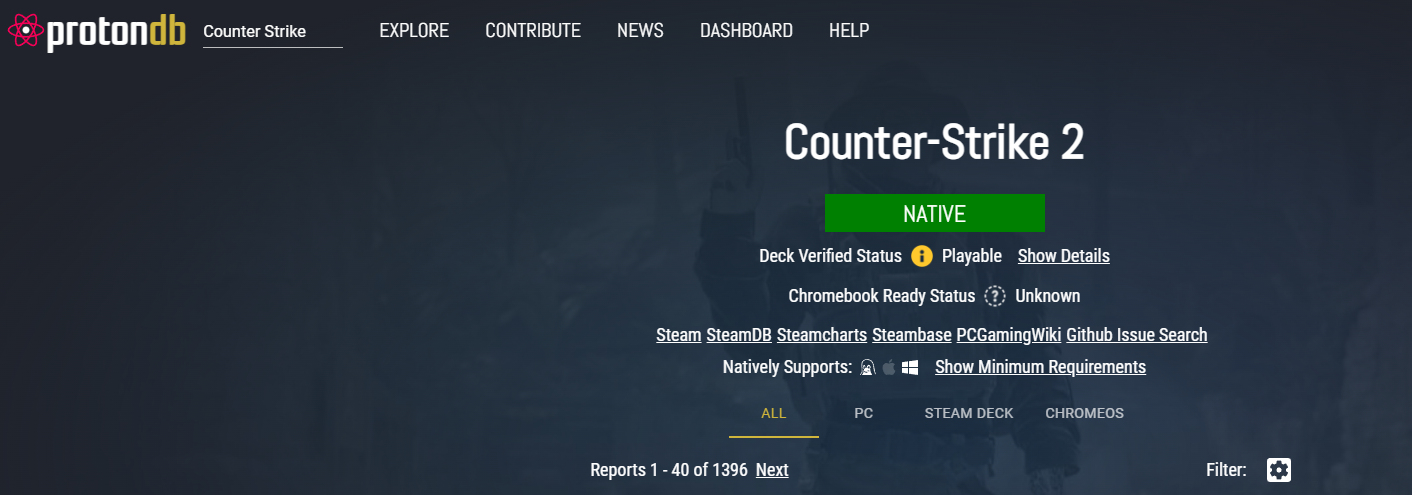
If only CS2 ran better on linux 😔
CS2
It has a native linux client: https://x0.at/I1ZV.png
In 2005 Windows was like 95% of the desktop/laptop market. Today it’s 70-75%. Since then mobile phones usurped a lot of functionality that used to require a desktop/laptop. Windows dependency is going to keep trending down both in just desktop/laptop or including mobile devices
“But most significantly, Microsoft has made Recall a feature you must opt in to using rather than opt out of using, and it’s possible to remove it completely.”
Important bit
“Whoopsie, we turned it on for everyone by accident after an update! We made a fucky wucky!”
“Whoopsie, turns out we lied and recall was enabled from the start and just pretended to be off” 😄🤷♂️
“we noticed you uninstall Recall. Probably just an accident. We reinstalled it in an unremovable way and enabled it for you. You’re welcome!”
Edit: autocorrect
😎 Me having set only security updates in my windows, after it tried to install the 24H2 update.
They will claim it’s security based
If they want to pay 2-3 Billions to EU for breaking laws, let them. I will also make so money suing them.
Didn’t they require one of these bigger upgrades to still get security updates? I thought I read something about 23H2 (or similar) not getting updates anymore.
opt in for now.
Also it’s not available on x86-64 CPUs. You need an ARM CPU with an NPU. Microsoft’s reasoning is so that the AI shit can be processed locally to protect your privacy. Apparently they’ve never heard of GPUs before.
Good! In my opinion this entirely changes the feature to acceptable.
They will eventually change the default to “on.”
At that time, my view of the feature will change to unacceptable. Until then, it is acceptable.
Most MS controversial features go through “opt in -> opt out -> mandatory” pipeline examples are Telemetry, Windows Live account, Spotlight (ui ads), etc.
This is good. There are probably some edge cases for this. I work in IT for some companies using industrial automation. Being able to roll back and watch what people do when errors or problems occur is a good feature. Similarly on high value servers I would like this as well.
Being able to turn it on is better than having to apply policies to disable. I don’t see this as a big problem anymore.
I’m not sure if you understood the comment you responded to…
There is a big concern of it recording confidential information that could be leaked as well.
For now, anyway. Let’s hope it stays that way.
only until they find out most people never enable it. Then it will be forced on
Yeah, this is just the thin end of the wedge.
Although I suppose you could call windows itself the thin end of the wedge, this is a slightly wider part.